
Chess Pro
AI Factory LimitedBoard
4.81.73K Reviews
- Version
- 4.18
- Installs
- 100.00K
- Age Rating
- Everyone
Screenshots
Our Review of Chess Pro
 Analysis by Appyee
If you’re anything like me, you love a good game that makes you think and strategize. Well, let me introduce you to Chess Pro, an app that brings the timeless game of chess right into the palm of your hand. Whether you’re a seasoned grandmaster or a curious newbie, this app has something for everyone. I downloaded it last week, and honestly, I’ve been hooked ever since.
Who will get the most from a dedicated chess app?
I’d recommend this kind of focused board game to someone who wants chess ready for a short break, a quiet evening, or a regular practice habit. The strongest reason to choose a dedicated chess app is that it keeps the board and the decisions at the centre of the experience. If you want a quick game without setting up a physical board or finding a partner, that convenience matters. It also suits a player who likes returning to the same familiar interface rather than browsing a broad collection of unrelated games.
There is a useful distinction between wanting to play chess and wanting to learn chess. A person who already knows the rules may be happy to jump straight into a match, while a newcomer benefits more from an app that explains ideas as well as moves. Chess Pro is presented as a teaching-oriented game, so it makes sense for a learner to approach it with a small goal: understand one tactical idea, practise it, then try to spot it in a game. That is more manageable than expecting a single session to turn a beginner into a strong player.
For an everyday example, imagine having ten spare minutes before an appointment. A full match might not fit comfortably, but a short practice session or a few tactical exercises could make that time feel worthwhile. I find chess apps most useful when they let me focus on one decision at a time, rather than treating every session as a serious tournament. If you tend to abandon games when interrupted, though, check how comfortably the app handles pausing and returning before relying on it for those scattered moments.
Intuitive Interface and Design
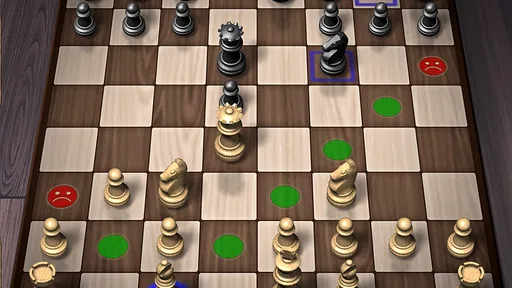
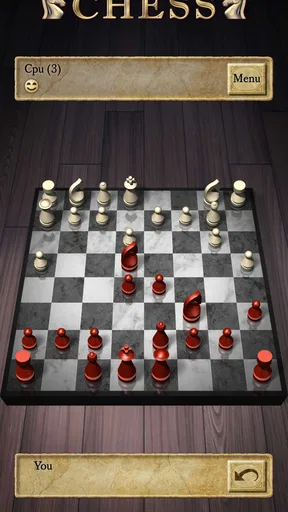
First things first, let’s talk about the design. Chess Pro has a sleek, user-friendly interface that makes it easy to dive right into the game. The moment you open the app, you’re greeted with a clean, easy-to-navigate layout. The boards are beautifully designed, and you can even customize the pieces to your liking. I found the graphics crisp and the animations smooth, which really enhances the overall experience.
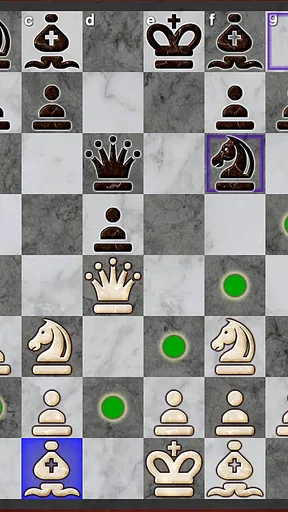
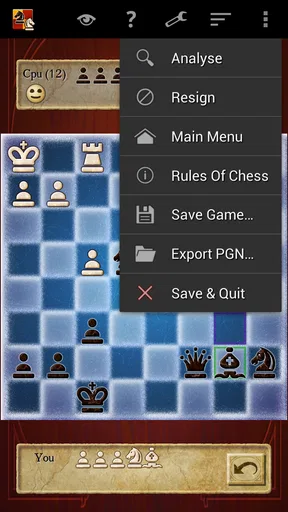
The app offers different themes for the board and pieces, which is a fun way to keep the game visually interesting. Whether you prefer a classic wooden board or a more modern look, Chess Pro has got you covered.
Making a comfortable board work for you
Board appearance is not just decoration when you are studying a position. A high-contrast combination can make it easier to follow diagonals and notice a piece that is under attack, while a more muted theme may feel calmer during a long session. I’d choose a board and piece set that lets me distinguish the pieces quickly, then leave it alone for a while instead of changing styles every game. Familiarity helps the eyes scan the board without extra effort.
That practical point matters especially on a phone, where the board occupies a smaller area than it would on a tablet or a physical set. If a move feels awkward, take a moment to check that you are selecting the intended square before confirming it. Chess rewards patience, and the best interface is the one that lets you concentrate on the position rather than fighting the controls. On a larger screen, the board can feel more spacious; on a phone, quick sessions are convenient, but dense positions may take more careful inspection.
Multiple Game Modes
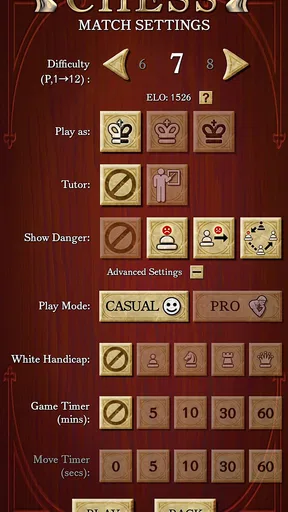
One of the standout features of this app is its variety of game modes. You can play against the AI if you’re looking to practice, and let me tell you, the AI is no pushover. It has multiple difficulty levels, so you can gradually increase the challenge as you improve. I started on an easier level just to get the hang of it, but I’m slowly working my way up.
If you’re in the mood for some social interaction, the app also offers a multiplayer mode. You can challenge your friends or random opponents from around the world. It’s a great way to test your skills and learn from other players. The matchmaking is pretty quick, and I haven’t experienced any lag during matches, which is always a plus.
Choosing between practice and a live opponent
Playing against a computer and playing another person serve different purposes. An AI opponent is handy when you want a game on your own schedule, or when you are experimenting with an opening and would rather not feel judged for an imperfect move. A human opponent can expose habits that a predictable practice routine might not reveal, but online play is less suitable if you only have a minute or two and may need to stop suddenly. I’d use solo practice to work on a specific weakness and multiplayer when I have enough time to focus on the whole game.
A useful training habit is to pick one question before pressing play: am I overlooking threats, moving too quickly, or leaving pieces undefended? After each game, think back to one moment where the position changed sharply. Even without turning a casual match into a formal study session, this small review makes play more purposeful. Increasing the computer difficulty is not automatically progress, either. If every game becomes a string of forced mistakes, stepping back to a level where you can recognise plans may teach more than simply chasing a tougher opponent.
Online chess also depends on the kind of opponent experience you want. If you enjoy adapting to unfamiliar styles, matchmaking can add variety; if you prefer a predictable pace, a computer game may be less stressful. I would not choose multiplayer as a substitute for structured coaching, because an opponent’s move does not necessarily explain why it is strong. Treat each game as a chance to notice a problem, then use a lesson or puzzle to examine that idea more directly.
Tutorials and Learning Resources
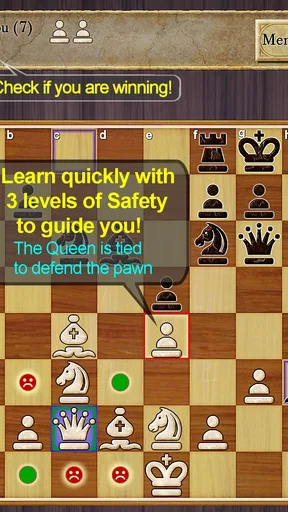
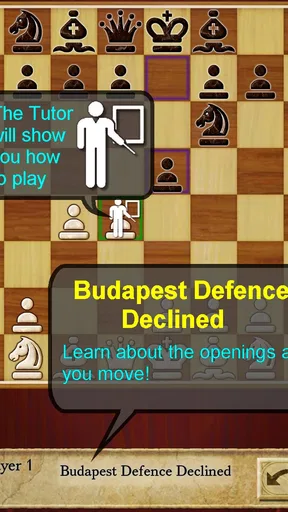
For beginners, Chess Pro includes a comprehensive tutorial section. It covers everything from the basic rules to advanced strategies. I found the tutorials very helpful in understanding the nuances of the game. There are interactive lessons where you can practice specific moves and tactics, which is a great way to build your skills without the pressure of a real match.
The app also provides access to a library of famous games and puzzles. These are perfect for studying famous strategies or just enjoying some legendary matches. I spent some time going through these and picked up a few new tricks. Who knew learning could be so much fun?
A better way to use lessons, puzzles, and classic games
Rather than working through learning material passively, I’d keep a simple loop: study a lesson, attempt a related puzzle, and then look for the same idea during a game. The puzzle is useful because it asks you to make a decision, not just recognise an explanation after the fact. If you miss the answer, pause and identify what you overlooked: a check, a capture, or a threat to a piece. That habit turns a wrong answer into a practical reminder for your next match.
Famous games are most valuable when you watch them with a question in mind. Instead of trying to memorise every move, notice how a player develops pieces, protects the king, or turns a small advantage into pressure. A complete game can be hard to absorb in one sitting, so it is reasonable to focus on a few moves and return later. For a new player, the rules and basic tactics should come first; advanced strategy is easier to understand once the board no longer feels crowded with unfamiliar possibilities.
These resources can help build independent study habits, but they are not the same thing as personalised instruction. A tutorial can explain a general principle, while a coach or strong playing partner can identify a recurring mistake in your own games. If you want detailed feedback on every decision or a structured training plan tailored to your level, a chess platform built specifically around analysis and coaching may suit you better. Chess Pro’s appeal is strongest when you want a playable board game with learning material alongside it, rather than a full replacement for dedicated study.
What changes mean for returning players
Chess Pro is a paid board game from AI Factory Limited, currently at version 4.18. Its long-running presence is reflected in a release date of August 27, 2010, and a current age rating of Everyone. That history may reassure someone who wants an established chess app rather than a brand-new experiment, but an old release date alone cannot tell me how every detail has changed over time. I would treat the current version as the clearest indication of the app’s present state, and avoid assuming that a particular feature has recently been added or redesigned without checking it directly.
For someone who already owns it, the practical question is less about the version number and more about whether it still fits the way they play. A returning player who mainly wants a familiar board and regular games may value continuity; a player looking for newer social tools, detailed analysis, or a constantly evolving online community may want to compare alternatives before settling in. Changes can affect comfort and compatibility, but they do not automatically change the core appeal of sitting down for a game of chess.
Performance and Compatibility
Performance-wise, Chess Pro runs smoothly on both Android and iOS. I tested it on my phone and tablet, and it worked like a charm on both devices. The app is lightweight, so it doesn’t take up much space, and I didn’t notice any battery drain issues, which is always a concern with mobile games.
It also supports offline play, which is fantastic for those moments when you’re without an internet connection but still want to get your chess fix. I used it on a long flight, and it was a lifesaver.
Where the trade-offs become important
Offline play is a particularly practical advantage for travel, commutes with unreliable reception, or places where I would rather not depend on a connection. It also makes a solo session easier to start: I can play against the computer without coordinating with anyone else. But offline convenience should not be confused with a complete substitute for online competition. If your main goal is to find a large, active community, follow other players, or take part in structured events, an online-first chess service is likely the better fit.
Chess Pro costs $4.99, so I would decide based on whether I expect to return to it, not just whether I fancy one casual game. The price is easier to justify for someone who values a dedicated chess app, offline use, and built-in learning material. If you only play occasionally, a free alternative may be enough; if you want extensive opponent analysis, databases, or a social chess network, compare those specific tools before paying. The game has an average rating of 4.8 from around 22,000 ratings, alongside roughly 1,700 written reviews, and has been installed over 100,000 times. Those figures suggest that many players have found it worthwhile, but they cannot tell you whether its particular style suits your own habits.
It is also worth considering what you want from chess on a phone. A physical board remains better for players who enjoy moving pieces around and reading a position at full size. A broad casual-game collection is more convenient if chess is only one occasional pastime. A specialised online chess service is a stronger choice for community features and competitive structure. This app makes most sense when you want a self-contained way to play and practise, rather than the newest social layer or the deepest analytical toolkit.
What to check before making it your regular chess app
The minimum operating system requirement is 6.0, which gives a clear compatibility check before installing. If you are moving from an older phone or tablet, confirm that your device meets that requirement and that the current app behaves comfortably on its screen. The game is rated Everyone, making its age classification broad, though a family should still decide whether online play and screen time are appropriate for its own needs. Those are practical questions worth answering before paying, especially if the app is intended for a younger player.
I would also think about what would make a session feel successful. If it is learning how pieces move, start with the fundamentals. If it is improving calculation, use puzzles deliberately rather than tapping through them quickly. If it is simply relaxing with a game, choose an opponent and pace that keep the experience enjoyable. These small choices make a chess app feel more useful without requiring a complicated study routine.
The main limitation is one of fit: a focused chess game cannot satisfy every kind of chess player equally. Beginners may want more explanation than a lesson can provide, while experienced players may expect deeper analysis or tournament-oriented tools. Someone seeking a polished online community may prefer another service, and someone who dislikes paying for a game may reasonably choose a free option. I would not recommend buying it on the assumption that a high rating guarantees a perfect match; I would recommend it when its combination of play, practice, and offline convenience matches what you actually want.
Final Thoughts
In conclusion, Chess Pro is a must-have app for chess enthusiasts and those looking to dive into the world of chess. Its intuitive interface, variety of game modes, and educational resources make it an excellent choice for players of all skill levels. Whether you’re playing solo or challenging friends, this app offers endless hours of brain-teasing fun.
So, if you’re ready to sharpen your mind and have a blast while doing it, give Chess Pro a try. You won’t be disappointed!
Verdict
Strengths of Chess Pro
- Highly intuitive user interface.
- Offers multiple difficulty levels.
- Comprehensive tutorials available.
- Supports online multiplayer mode.
- Customizable board themes and pieces.
Limitations of Chess Pro
- No offline multiplayer option.
- Occasional lag in online matches.
- Limited free features.
- Ad interruptions in free version.
- Requires constant internet connection.
Other Releases by AI Factory Limited
View All


Similar Picks in This Category
View All
Ludo King®
Gametion4.1

Ludo
Yarsa Games4.6

Tile Master® - Matching Game
Higgs Studio3.6

Checkers Online
CC Games4.6

Dominoes
Loop Games4.7

Chess
Chess Prince4.6
Frequently Asked Questions
What features does Chess Pro offer for beginners?
Chess Pro is designed with beginners in mind, offering a comprehensive tutorial section that covers the basics of chess. The app includes interactive lessons, tips, and strategies to help new players understand the rules and improve their skills. Additionally, it offers adjustable difficulty levels, allowing beginners to gradually increase the challenge as they progress.
Does Chess Pro support multiplayer options?
Yes, Chess Pro supports both online and local multiplayer modes. You can challenge friends or play against other users around the world in real-time. The app also includes a chat feature, allowing players to communicate during matches. For those who prefer offline play, Chess Pro offers a pass-and-play option for local multiplayer games.
Is Chess Pro suitable for advanced players?
Absolutely. Chess Pro caters to advanced players with features like an advanced AI engine that adjusts to higher skill levels, providing a challenging experience. The app includes a large database of famous games and puzzles that can help seasoned players refine their strategies. Additionally, it offers detailed analytics and game reviews to help players analyze their performances.
Are there any customization options available in Chess Pro?
Chess Pro offers a wide range of customization options to enhance your playing experience. You can choose from different board styles, piece designs, and themes to suit your preferences. The app also allows you to customize the game's difficulty settings and time controls, providing a personalized chess experience tailored to your liking.
What platforms is Chess Pro available on, and how can I download it?
Chess Pro is available for both Android and iOS devices. You can download it from the Google Play Store for Android or the Apple App Store for iOS. Simply search for 'Chess Pro' in your device's app store and follow the installation instructions. The app is compatible with most smartphones and tablets, ensuring a seamless chess experience across different devices.
Play our best games!


